



QPR ProcessDesigner

Design how your business should run – and give people and AI the same playbook

Model, govern and share your processes in one place. QPR ProcessDesigner keeps process models current, easy to update and connected to real process data — so both people and AI assistants such as Microsoft Copilot, Claude and ChatGPT can work from the same operational context. 

BOOK A DEMO

Customer rating: 9.7/10

Trusted by leading organizations to drive operational excellence, accelerate transformation, and turn complexity into measurable business results. 

Your process documentation is out of date the day it’s published

Most organizations still keep their processes as static diagrams in slides, PDFs and shared folders. Versions multiply, updates depend on modeling experts, and documented processes quickly drift away from how work actually runs.

Now AI raises the stakes. AI assistants and agents are only as useful as the business context they can access. If your processes live in files no system can read, AI is left guessing how your organization works.


Many versions, no owner

Processes are scattered across tools and teams, so people follow whatever version they find first.

Designed vs. actual

Documented processes drift away from how work really flows in ERP and other systems – and nobody notices.

Invisible to AI

Copilots and agents can’t follow rules, roles and controls they can’t see.

Design how work should flow across organization

QPR ProcessDesigner is a BPMN 2.0 process modeling and management tool. It gives your organization one trusted place for processes, roles and controls – shared with everyone, and usable by AI.

  • Define roles, responsibilities and decision points
  • Model processes together and share them in the browser
  • Give AI assistants a trusted source of how work should run
  • Compare designed processes with how work really runs
  • Connect processes to strategy, KPIs and execution
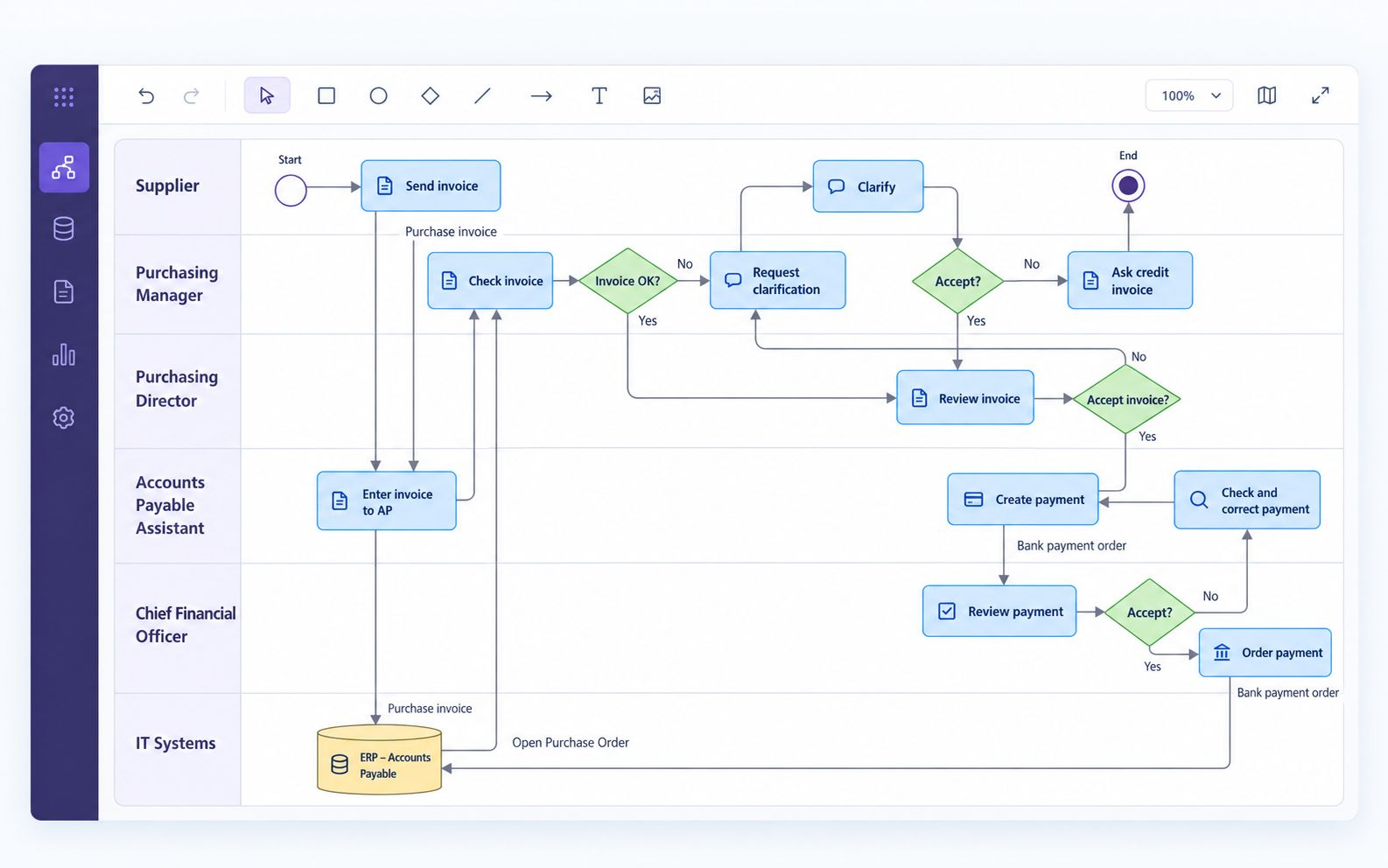
Purchase Invoice Approval Workflow

Your process models, available to the AI tools your people already use 

Give AI assistants access to your approved process models and enterprise architecture information through QPR MCP Server.

Your teams can ask questions in natural language using tools such as Claude and Microsoft Copilot, and get answers grounded in your organization's modeled processes, roles and responsibilities.

QPR MCP Server connects AI tools to your existing QPR modeling environment, respecting configured access permissions.

What is MCP?  Model Context Protocol is an open standard that lets AI assistants connect securely to business systems – one common plug instead of a custom integration for each.

05b_AI_assistant_chat_card(1)

Run it the way your IT prefers

Discover QPR ProcessDesigner in action

See how QPR ProcessDesigner helps you design, manage and share business processes — and connect process design with real operational insights.

Key capabilities of QPR ProcessDesigner


Fast and easy process modeling
Create and edit process models with drag-and-drop and full BPMN 2.0 support. The tool palette follows your chosen modeling language, and the process hierarchy is built automatically, so even large model sets stay organized.


AI-assisted modeling and natural language.
Describe a process in plain text, and Text-to-BPMN turns it into a first diagram. A conversational interface lets you ask questions about your process information in natural language.


Simultaneous modeling
Several users can model in the same environment at the same time, so teams design, review and validate processes together.


Diagram, Navigator and Matrix views
Design processes in the Diagram view, manage elements and attributes in the Navigator view, and see how elements relate in the Matrix view – the same content from three angles.


Open metamodel and industry standards
BPMN 2.0 out of the box, plus ArchiMate (2 and 3.2), TOGAF 9, UML 2.5, DMN and EPC. The open metamodel also supports your own custom notations.
Central repository, one source of truth
All process content lives in one version-managed repository. Reuse elements across models and keep processes consistent across business units.
Version management
Processes in development stay separate from published ones, so people only see approved, current content.
Configurable governance
A base model defines the modeling rules, element types and attributes that all child models inherit, so your standards are applied the same way across the whole model landscape.
Role-based views and ribbon
Each user sees the content and commands that matter to their role, so everyone finds what they need quickly.
Web publishing with QPR BusinessPortal
Turn technical process models into clear, business-friendly guidelines for everyone in the organization. Users can read, comment on and edit BPMN diagrams directly in the browser.
Multilingual modeling

The tool is available in 20+ languages and supports multilingual models, so teams maintain and read processes in their own language.

Document links
Attach instructions, policies and other documents directly to model elements, so reference material stays with the process it belongs to.
Export to Microsoft tools
Export models to Microsoft tools for further editing, reporting and sharing.
Process mining integration
Use your design models for conformance checking with QPR ProcessAnalyzer, enrich them with performance data, and turn them into data-driven as-is models.


AI clients via MCP
Connect your process repository to Microsoft Copilot, Claude, ChatGPT and other AI clients, and ask about your processes in the AI tools your people already use.
Enterprise architecture
Link processes to systems, capabilities, data and strategy with QPR EnterpriseArchitect.
Back to top

See how leading companies drive change

Wärtsilä transformed their internal audit approach with QPR ProcessAnalyzer

"We get total visibility to our processes and data, there’s no longer a need for extrapolation and assumptions based on sampling."

Metsä Group eliminates uncertainties through continuous improvement

"The process insight and facts delivered by QPR ProcessAnalyzer were priceless. We were immediately able to focus our process improvement activities on the right things to achieve the results our business needed. Not wasting time on trial and error.”

Piraeus Bank cuts lead times by 86% through unprecedented process  transparency

Piraeus Bank locates process bottlenecks and increases efficiency.

"We gave the data to QPR ProcessAnalyzer, and right away, in 5 minutes, we saw the bottlenecks of the process."

Sanofi streamlined their internal job change process with QPR ProcessAnalyzer

“By combining user-centric process design with QPR ProcessAnalyzer, we reduced the median Job Change Process duration from 8.9 to 0.9 days and cut completion times by 90%.”

Take the next step in process excellence.

Read our latest blogs, watch insightful webinars, and discover proven strategies to accelerate automation, compliance, and AI-driven transformation.
Where Process Intelligence Is Heading: 5 Questions with Gary Chitan of TOCH Consulting
5questions-Gary-Chitan

Where Process Intelligence Is Heading: 5 Questions with Gary Chitan of TOCH Consulting

Oct 8, 2026
How Ericsson Uses Process Mining for Trade Compliance | QPR
Ericsson

How Ericsson Uses Process Mining for Trade Compliance | QPR

Sep 30, 2026

Sign up for our newsletter